The short version
- Two critical bugs in PHP itself, CVE-2026-109618 and CVE-2026-109619, let an attacker run code on a web server without logging in. PHP released fixes on 21 October: 8.5.12, 8.4.27, 8.3.36 and 8.2.35. [1]
- CISA put both on its exploited list on 26 October. [3] Nothing in your own code is involved, so a code audit does not answer this.
- PHP 8.1 and older get no official fix. [1] About a third of PHP sites run PHP 7 or older. [12]
- It sits under every PHP platform, not only Laravel. WordPress runs 39.5% of all websites, WooCommerce 7.8%, Drupal 0.6% and Magento 0.3%, with Laravel and Symfony products behind many others. [12]
- Your platform version decides which PHP you can run. Magento 2.4.4 and 2.4.5 run only on PHP 8.1, which has no fix, so for those stores the fix is a Magento upgrade. [17]
- Hosts on supported PHP patched fast: 85% on a fixed build within six days. Hosts on end-of-life PHP: 6.4% after a week. [9]
- Framework support is not PHP support. Laravel 11 has had no security fixes since 12 March, and Symfony 5.4 gets security fixes to 2029 while running on PHP versions that get none. PHP 8.2 itself loses fixes on 31 December 2026. [5][8][19]
- If nobody is named against your server, you are probably in the second group. Fixing it today is a planned job. After an incident it is the same job plus the clean-up.
Five-minute triage: are you exposed?
Run these on the server that serves your site, or ask whoever does. If you are on managed hosting, the third column tells you what to ask.
| What is it built on, and which version? | WordPress: Tools, Site Health, Info, Server shows the PHP version. WooCommerce: WooCommerce, Status. Magento: bin/magento --version. Drupal: Reports, Status report. Laravel: php artisan --version. Symfony: php bin/console about. | The platform version decides which PHP you can move to. See the platform table below. |
| Which PHP serves the website? | php -v shows the command-line PHP, which can differ from the web one. For the web one, look at the handler in your web server config (fastcgi_pass or proxy_fcgi socket names such as php8.3-fpm.sock) or run ps aux | grep php-fpm. In Docker: docker exec <container> php -v. On shared hosting, read the PHP selector in the control panel. | 8.1 or older: no official fix exists. 8.2 to 8.5: fixable by updating. |
| Is it the fixed build? | Official Docker image or a build from source: the version must be 8.2.35, 8.3.36, 8.4.27, 8.5.12 or later. Linux distribution package: do not trust the version number. Check the changelog for the CVE, for example rpm -q --changelog php-fpm | grep CVE-2026-109618 on Red Hat family systems, or apt changelog php8.3-fpm | grep CVE-2026-109618 on Debian and Ubuntu. | AlmaLinux says it plainly: its fixes are backported, so the upstream version number does not change. [6] |
| Was PHP restarted after the update? | systemctl status php8.3-fpm shows when the service started. For Apache with mod_php, check when Apache last restarted. | A patched package under an old running process protects nothing. [6] |
| Is there more than one PHP on the box? | List every handler and pool: ls /etc/php/*/fpm/pool.d/ and search your web server config for every PHP socket. Look for an old WordPress, a staging site, phpMyAdmin or an admin tool. | Teams patch the product and forget the one that has sat unchanged for two years. |
| Which Laravel version? | php artisan --version, or composer show laravel/framework. | See the support table below. |
| Who is named against this server? | Not a command. Who patched it last, on what date, and where is it written down? | If the honest answer is "nobody" or "the agency that finished in 2024", treat the server as exposed. |
Reading your results:
- Red. PHP 8.1 or older, a platform version that can only run an unfixed PHP, or Laravel 11 or older with no one named. Act this week.
- Amber. Supported PHP, patched package, but never restarted, or more than one PHP and you have only checked one. Fix today.
- Green. A supported PHP on a build with the fix, restarted, every pool checked, an owner named. You are done, and you should write down the date and who confirmed it.
What leaving it can cost
What the flaw lets an attacker do
Picture an old car in an unlocked garage with the doors unlocked. Nobody has to break in. That is what "unauthenticated" means here: the attacker needs no password, no account and no stolen key, because there is no lock to beat.
Two details make the picture more accurate. First, for most cars the lock has been made. PHP has released the fix for 8.2 to 8.5, so for those versions the job is fitting it, and Bitsight found the large hosts did that fast. [9] For PHP 8.1 and older, the maker has stopped producing locks for that model. You can fit an aftermarket one, which is a vendor backport, or swap the car, which is a move to a supported version. [1]
Second, a thief of this kind does not always drive off. A hacked server usually stays in your garage looking normal while somebody else uses it. That is how this autumn's Magento attacks left backdoors and card skimmers behind. [7]
It is not push-button for every opportunist, and I would not say it is. Bitsight and Sansec both noted that an attack depends on knowing the target's PHP build, so not every passer-by can hotwire it. [9][4] But there is now a list of people who can, and CISA has put the flaw on its exploited list. [3] The stopgaps in the fix section are steering locks: PHP itself says there are no complete mitigations. [1]
Both bugs are in how PHP handles a web request as it starts and finishes. One comes from the engine mishandling memory when it runs out partway through setting up a request. The other lets a later request on the same worker reuse leftover state from an earlier one. [1] Every known trigger so far is a multipart/form-data request, the format browsers use for file uploads. [4] PHP says Apache with mod_php is the highest risk, because an attack there can succeed before any of your application's own code has run. [1][2]
That is why "our code is clean" does not help. Sansec's wording is that Magento, Shopware and WooCommerce stores are affected "even when their own code is clean". [4] The same holds for Laravel and for WordPress.
On how easy it is: Bitsight's early data showed one credible exploit chain and said most scanning traffic lacked what an attack needs, because it depends on knowing the target's PHP build. [9] Sansec said the same on the day. [4] CISA listed both CVEs on 26 October regardless, and watchTowr reported attacks from the first day. [2][3] Read that as: exploitable on some servers by skilled attackers, not yet on every server by everyone, and the gap narrows as exploit code spreads.
What a foothold turns into
I can give you real examples of the shape, and the cleanest is Binance, with an honest warning about scale.
On 29 October, about $6.36 billion left Binance wallets across ten blockchains, most of it in around 20 minutes from 20:05 UTC. [13] Binance says its investigation started from a compromised DevOps engineer's laptop. Its CEO, Richard Teng, said it was not a single one-click action and that the attacker did not simply use one engineer's permissions. The attackers reached a service container and submitted unauthorised withdrawals. Binance found no evidence that wallet private keys had leaked and says there were further points of breach. [13] The FBI attributes the theft to North Korea's TraderTraitor group. Binance paused deposits and withdrawals and says it is covering the losses from its SAFU fund and company money, and that it has replaced 90% of the stolen assets. [13]
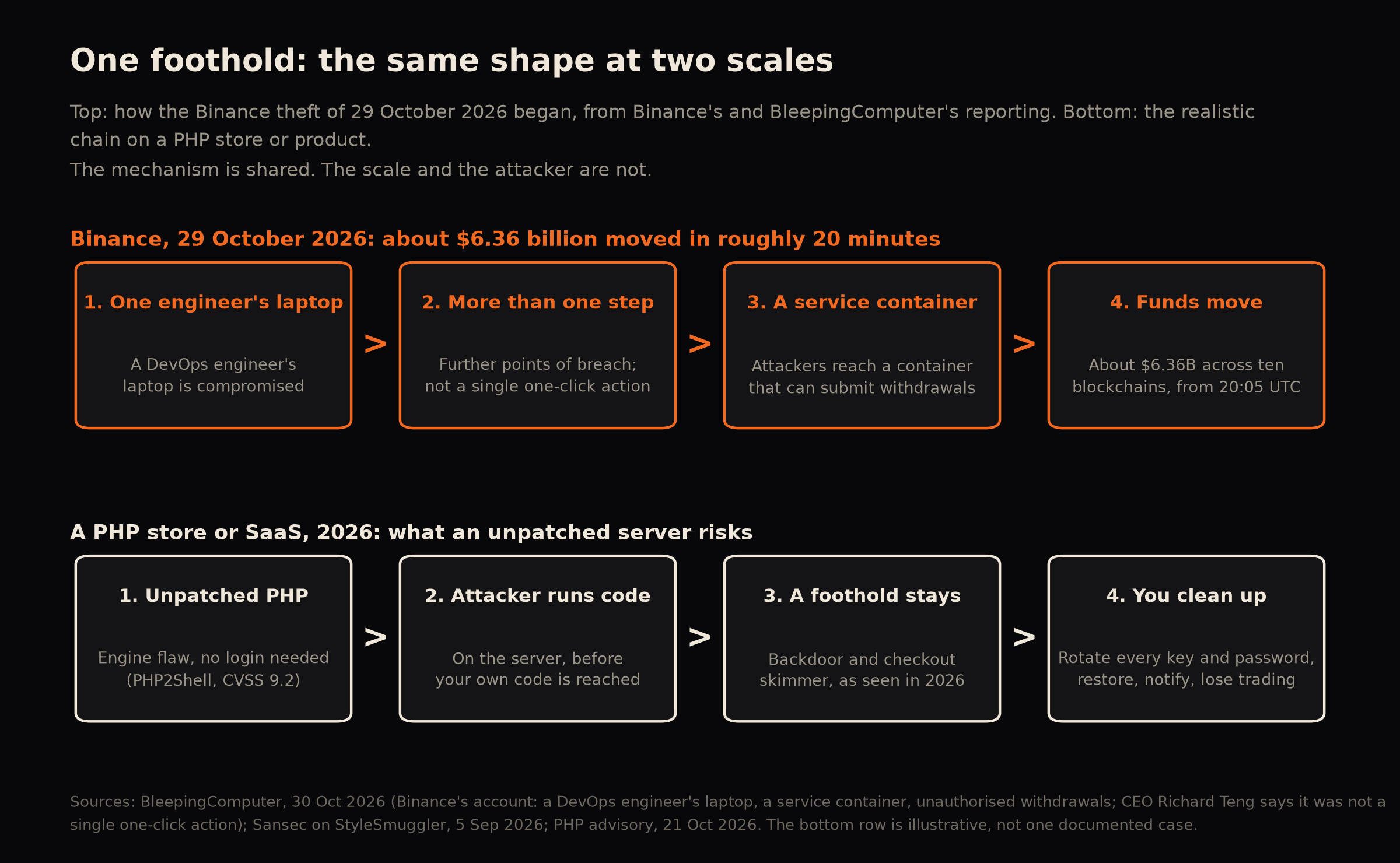
This is not a claim that PHP2Shell was involved at Binance, and a state-backed group going after an exchange is not what most shops face. The shape is what carries across: one foothold on a machine nobody thought hard about, then more access than anyone planned for, then a bill. Binance could take the loss. A small business cannot take a month with its checkout down, every credential rotated and its customers told.
What a clean-up consists of
For a PHP store the documented version is StyleSmuggler, this autumn's Magento flaw. Sansec reported backdoors disguised as system processes, payment skimmers added to store configuration, and a long rotation list: encryption keys, admin passwords, API tokens and payment gateway credentials. Its warning is the important one: patching closes the hole and does not clean a store that was already hit. [7]
In practice, an incident means:
- Finding out when the foothold started, which means reading logs that may have been overwritten.
- Rebuilding the server from a known good state, not repairing it.
- Rotating every secret the server could read, then finding every system those secrets reached.
- Checking the checkout and admin for skimmers and new admin users.
- Telling people. If personal data was exposed, UK GDPR requires telling the ICO within 72 hours of becoming aware, unless the breach is unlikely to risk people's rights. [24] If card data is involved, your card acquirer expects to hear.
- Trading with a degraded site while that happens.
For scale, IBM's 2025 report puts the average UK breach at £3.78 million for organisations not using AI and automation in security and £3.11 million for those that do. Its sample is 600 mostly large organisations, so your own figure will be far smaller. It is the only UK cost figure I could verify. [14]
How many sites are still exposed to PHP2Shell
Four groups have measured it. They disagree on the headline, and the reason matters before you quote any of them.
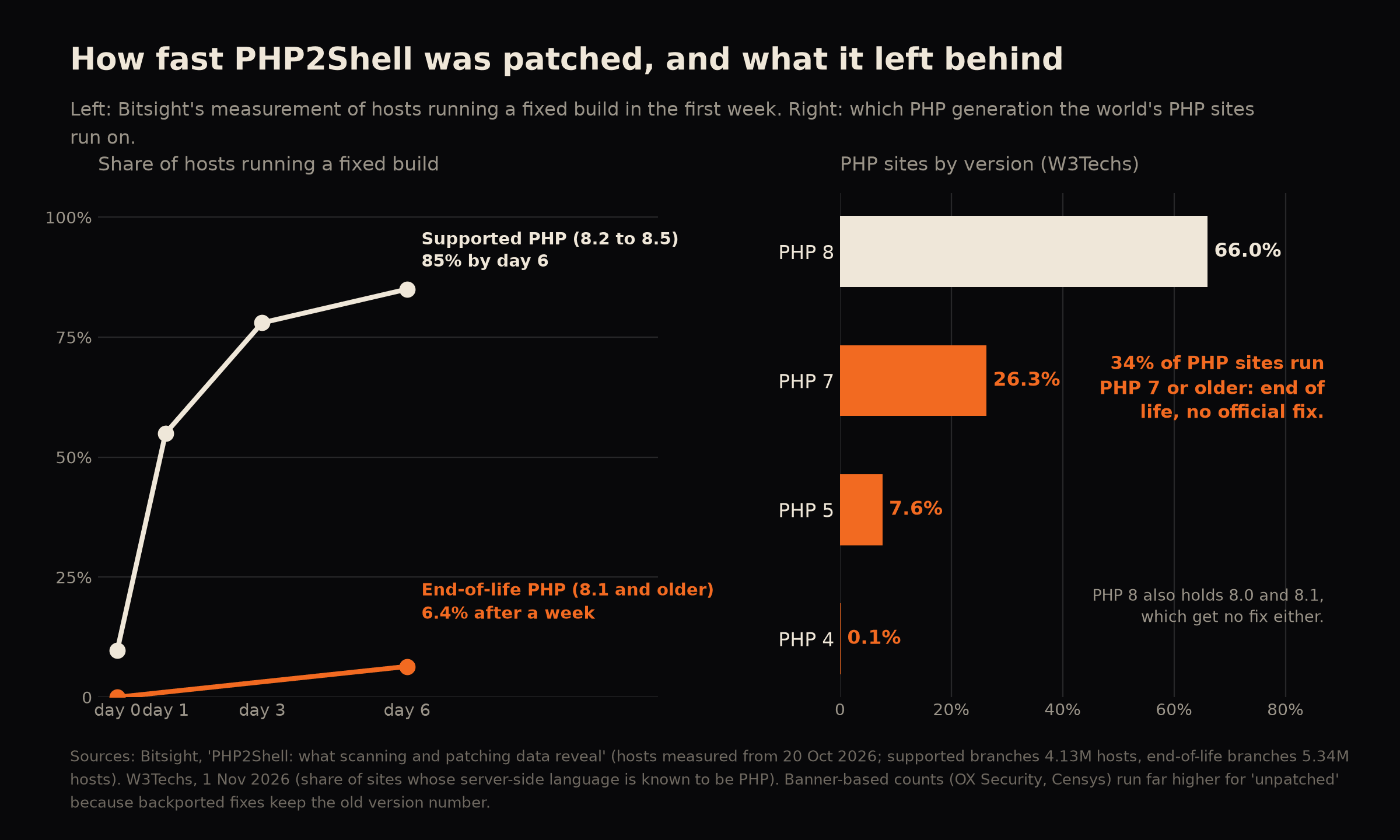
| W3Techs, 1 Nov 2026 [12] | Sites whose server language is known | PHP runs 69.1% of them. Of PHP sites, 26.3% are on PHP 7, 7.6% on PHP 5, 0.1% on PHP 4: 34.0% on end-of-life branches | PHP 8 also contains 8.0 and 8.1, which are end of life too |
| Bitsight, from 20 Oct [9] | About 29.2 million PHP hosts | 18.4 million (63.1%) on vulnerable versions before the fix. 11 million on branches that get no upstream fix | Recognises fixed builds, so it counts backported patches |
| Bitsight, first week [9] | 4.13 million hosts on supported branches, 5.34 million on end-of-life branches | 68.6% of supported-branch hosts patched within a week, 85% by day 6. Only 6.4% of end-of-life hosts | Does not label hosts as managed or self-managed |
| Censys, 23 Oct, via heise [11] | PHP services by version number | More than 41 million flagged at first, 33.5 million once about 8 million had updated | 54% of services hide their version. Backports are not recognised |
| OX Security, 24 hours and day 5 [10] | About 2 million hosts that advertise a version (Shodan) | 99.3% unpatched at 24 hours, 93.6% at day 5. About 1.33 million affected hosts on end-of-life branches | Reads the version number, so a patched distribution package still looks vulnerable |
Bitsight looks for a fixed build, so it spots a patched package whose version number has not changed. OX Security and Censys read the version a server announces, and a fixed distribution package keeps the old number. So the banner-based counts overstate how much is unpatched, and nobody can say by how much. The truth sits between them.
The shape is the same in all of them. Hosts on supported PHP patched fast: 55% on a fixed build after one day, 78% after three. Hosts on end-of-life PHP barely moved, at 6.4% after a week out of 5.34 million. Those cannot be fixed by installing a package. They need a version change, and that is a project.
What runs on top of it
PHP2Shell sits under the platform, so count what is on top. W3Techs puts WordPress on 39.5% of all websites, WooCommerce on 7.8%, Drupal on 0.6% and Adobe Commerce (Magento) on 0.3%. [12][20] Laravel is far smaller: Wappalyzer tracks about 510,000 websites using it, with no date given on its page. [15]
OX Security broke its measurements out by platform. Five days after the fix, 93.65% of its measurable WordPress hosts were still on an unfixed PHP, from a sample of 35,061, and 94.78% of Drupal's 3,890. [10]
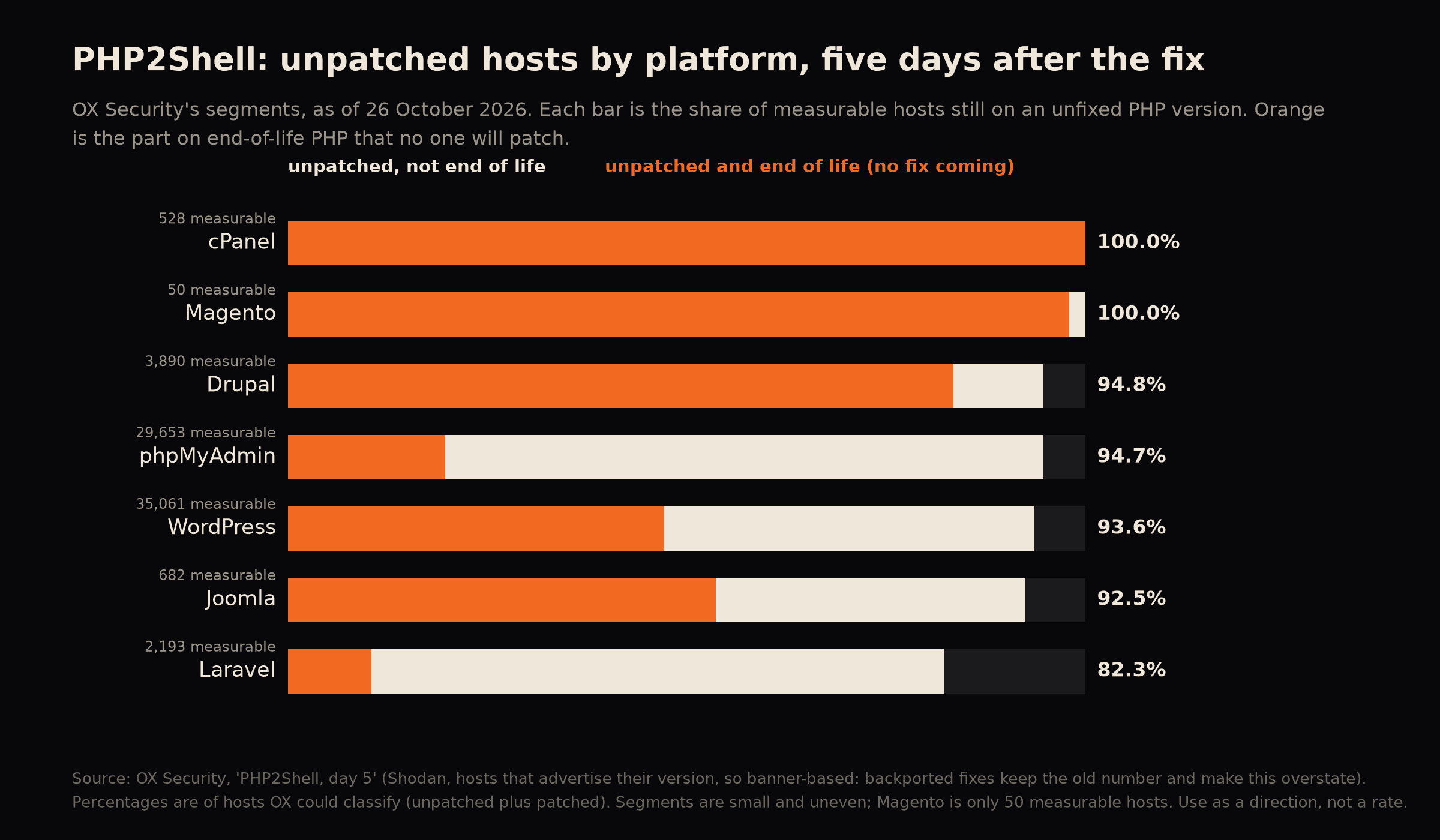
| WordPress | 35,061 | 93.65% | 16,547 hosts |
| phpMyAdmin | 29,653 | 94.72% | 5,854 hosts |
| Drupal | 3,890 | 94.78% | 3,248 hosts |
| Laravel | 2,193 | 82.26% | 229 hosts |
| Joomla | 682 | 92.52% | 366 hosts |
| cPanel | 528 | 100% | 528 hosts |
| Magento | 50 | 100% | 49 hosts |
Read these with care. They count by version number, so a patched distribution package still looks unpatched. The segments are uneven, and Magento is 50 hosts, too few to call a rate. Two things in the table are worth noticing anyway. Most of Drupal's unpatched hosts, 3,248 of 3,687, are on end-of-life PHP that no one will fix, and the Magento hosts OX could classify were almost all on it too. Laravel's unpatched hosts are mostly on supported PHP that has simply not been updated, which is the easier problem. [10] No one has published a count of unpatched PHP broken down by platform and by hosting type. That is the closest figure there is.
Managed host or your own server
Nobody has published a split between managed hosting and self-managed servers, so I cannot give you a percentage. The gap that matters is maintained against unmaintained, more than managed against unmanaged: 68.6% against 6.4%, from Bitsight. [9] Patching also varied sharply by country in the same data (Sweden 89.6%, Germany 51.6%, the United States 26.2%, China 3.8%), which fits large hosting fleets patching in bulk, though Bitsight does not label hosts by type, so that reading is mine. [9] The large managed WordPress hosts said publicly within days that the fix was applied. Trackers list WP Engine, SiteGround, Cloudways, Hostinger, GoDaddy and Kinsta. Check your own host's notice, because I have not verified each at source.
| Fully managed host | The host | Ask for written confirmation and check the build date, not the version number |
| Shared hosting with a PHP selector | The host patches the versions it offers; you choose which one you run | Select 8.3 or 8.4, not 8.1 |
| Your own VPS or server | You, or whoever you pay | Patch, restart, record the date and who did it |
| A container image you build | You, at the next build | Rebuild from a fixed base image and redeploy |
| Anything on PHP 8.1 or older | Nobody, because the PHP project has stopped | Plan a version move: this is the group that barely patched |
Platform by platform: what PHP you need, and what to upgrade to
Your platform sets the PHP you are allowed to run. If your platform version can only run an unfixed PHP, the platform upgrade is the fix, which is why "update PHP" is rarely one step.
| WordPress | Recommends PHP 8.3 or greater. Minimum currently supported PHP 7.4, which WordPress notes is end of life and may expose your site to security vulnerabilities [16] | PHP 7.4 to 8.1 are unfixed. Move to 8.3 or 8.4 |
| WooCommerce | PHP 8.3 or greater, tested up to 8.4, with WordPress 6.9 or greater, and MySQL 8.0 or MariaDB 10.6. PHP 7.4 is a legacy option, end of life [18] | Same: 8.3 or 8.4, and the WordPress and database versions have to move with it |
| Magento and Adobe Commerce | 2.4.9: PHP 8.5. 2.4.8: 8.4 or 8.3. 2.4.7: 8.3 or 8.2. 2.4.6: 8.2 or 8.1. 2.4.5 and 2.4.4: 8.1 only [17] | 2.4.4 and 2.4.5 can only run PHP 8.1, which has no fix, so the fix is a Magento upgrade. 2.4.6 can run PHP 8.2 with its fix, but see the Magento notes below |
| Drupal | Drupal 10.4 to 10.6: PHP 8.1, 8.2 or 8.3. Drupal 11.1 to 11.4: PHP 8.3 or 8.4. No supported Drupal supports any PHP 7 [21] | Drupal 10 on 8.1 should move to 8.3. Drupal 11 needs 8.3 or 8.4 |
| Symfony | See the Symfony table below [19] | Framework support runs longer than PHP support, so check both |
| Laravel | See the Laravel and PHP windows below [8] | Laravel 13 on PHP 8.4 has the longest runway |
| Shopware | Affected, per Sansec [4]. Ask your developer or host which PHP your Shopware version supports | Shopware is built on Symfony |
Symfony
| 8.1 (current) | 8.4.0 | January 2027 | January 2027 |
| 7.4 (LTS) | 8.2.0 | November 2028 | November 2029 |
| 6.4 (LTS) | 8.1.0 | November 2026 | November 2027 |
| 5.4 | 7.2.5 | November 2024 (ended) | February 2029 |
Source: symfony.com/releases. [19] The trap is in the last row. Symfony 5.4 gets security fixes until February 2029, yet it runs on PHP from 7.2.5, and every PHP before 8.2 is either end of life or, for 8.1, unfixed. A Symfony 5.4 app can be fully patched at the framework layer and wide open underneath. Symfony 6.4's minimum is PHP 8.1, so run it on 8.3 or 8.4. For anything with a future, 7.4 on PHP 8.4 is the combination with the longest runway.
PHP and Laravel support windows
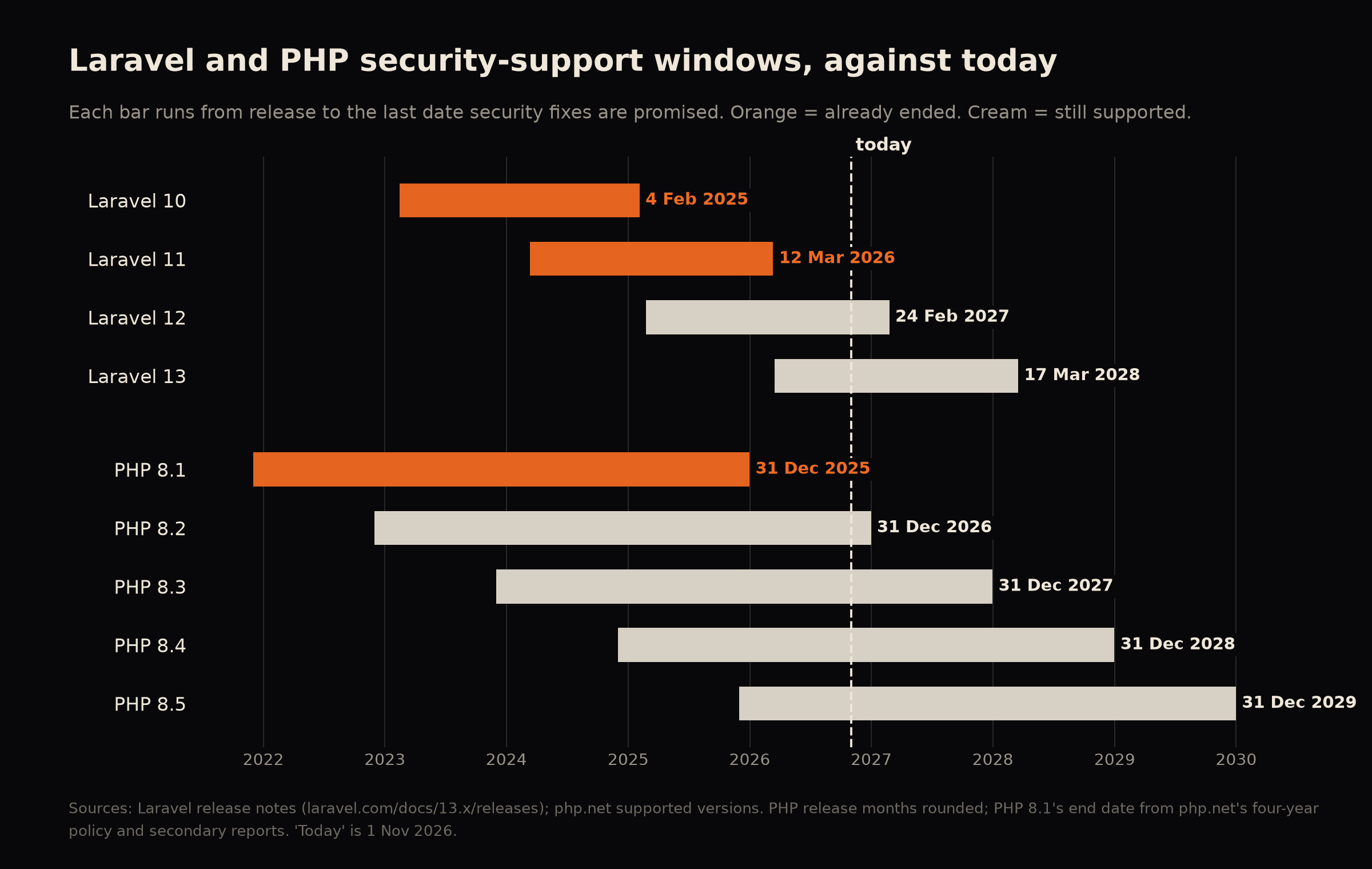
| 10 | 8.1 to 8.3 | 6 Aug 2024 | 4 Feb 2025 | Out of support |
| 11 | 8.2 to 8.4 | 3 Sep 2025 | 12 Mar 2026 | No security fixes since March |
| 12 | 8.2 to 8.5 | 13 Aug 2026 | 24 Feb 2027 | Security fixes only, for another four months |
| 13 | 8.3 to 8.5 | Q3 2027 | 17 Mar 2028 | Current |
| 8.1 and older | Ended (8.1 ended 31 Dec 2025) | No official release. Source backports and vendor builds only |
| 8.2 | 31 Dec 2026 | Yes, 8.2.35 |
| 8.3 | 31 Dec 2027 | Yes, 8.3.36 |
| 8.4 | 31 Dec 2028 | Yes, 8.4.27 |
| 8.5 | 31 Dec 2029 | Yes, 8.5.12 |
Sources for the tables: Laravel's release notes and php.net. [5][8]
What follows from them:
- Laravel 10 on PHP 8.1 is out of support at both layers and has nothing from either project.
- Laravel 11 can at least be patched at the PHP layer on 8.2 to 8.4, but the framework itself gets no security fixes.
- Laravel 12 on PHP 8.2 looks safe today and is not for long: PHP 8.2 loses security support on 31 December 2026, and Laravel 12 on 24 February 2027.
- Laravel 13 on PHP 8.4 has the longest runway at both layers: March 2028 and December 2028.
One more Laravel-specific note. CISA's exploited list includes a flaw in Livewire, CVE-2025-54068, added on 20 March 2026. [3] If your application uses Livewire, check its version against that advisory as well.
What fixing it actually involves
This is the part people underestimate, because "update PHP" sounds like one command. It is five jobs, and the order matters.
1. The stopgap, for today
If you cannot upgrade this week, the PHP advisory lists partial mitigations. It is explicit that "there are no complete mitigations, updating is the only safe choice". [1] The measures it gives:
memory_limit=-1, set withphp_admin_valuein the FPM pool or Apache config so the application cannot override it. This removes the controllable memory-limit failure, but the advisory notes an underlying allocation failure can still reach the vulnerable path.post_max_sizeof 8M for apps without file uploads and 32M for apps with them, withupload_max_filesizebelow it.session.upload_progress.enabled=0, set inphp.ini, the FPM pool or server config before request parsing. Do not rely onini_set()or.user.ini. This blocks the confirmed session paths and not other variants.- On PHP 8.5,
fatal_error_backtraces=0, applied to all workers with a restart. - Limits at the web server or proxy for request size, field count, multipart part count, header count and nesting depth, including requests with no usable
Content-Length. - A container or cgroup limit as an availability boundary. The advisory says not to substitute
RLIMIT_ASorRLIMIT_DATA, because those can cause the vulnerable allocation failure. [1]
Sansec suggests a blunter rule: refuse multipart/form-data requests at the web server. [4] That works as a stopgap and it also stops every file upload on the site, including product images, CSV imports and admin media. Do not leave it in place, and test it before you rely on it.
For PHP 8.1 specifically, the PHP security team published minimal source backports for 7.4, 8.0 and 8.1, and some distributions and paid long-term-support vendors ship their own fixed builds. [1] That keeps an old stack standing while you plan the move. It is not the plan.
2. The PHP move
Pick the target by security window, not by what is easiest. PHP 8.2 is patched today and ends on 31 December 2026, so moving to it means doing this twice. 8.4 gives security fixes to the end of 2028. [5]
What actually takes the time:
- Composer constraints.
composer why-not php 8.4shows which packages refuse the new version. Abandoned packages are the usual blocker, and each one is a decision: replace, fork or remove. - Deprecations. PHP 8.2 deprecated dynamic properties and PHP 8.4 deprecated implicit nullable parameter types. Old code written before either produces
Deprecatednotices, and they only appear if error reporting shows them. Run staging withE_ALL, load every important page and read the log. These are warnings now and errors later. - Extensions. Anything installed through PECL or a system package (image processing, Redis, imagick, a payment SDK's native extension) has to exist for the new PHP on your operating system.
- The configuration.
php.ini, FPM pool settings and OPcache settings differ between versions. Copying the old files across is how things quietly go wrong. Start from the new defaults and carry over what you can justify. - The web server handler. A new PHP version means a new FPM socket or service name. Nginx and Apache configs that name the socket have to change with it.
- The base image. In Docker, rebuild from a fixed base image and pin the tag. Do not float on
latest.
3. The platform move
The PHP move is the same everywhere. This step is where platforms differ.
PHP2Shell on WordPress and WooCommerce
Often the PHP change is one setting in your host's control panel. Updating WordPress, WooCommerce, your theme or your plugins does not fix PHP2Shell, because the flaw is in PHP. Only a fixed PHP does. The updates matter for a different reason: plugins and themes written for an older PHP are what break when you flip the setting.
- Copy the site to staging first.
- Update WordPress core, WooCommerce and every plugin before changing PHP. Current WooCommerce needs PHP 8.3 or greater and WordPress 6.9 or greater. [18]
- Switch PHP on staging, turn on
WP_DEBUGwith logging, and walk the paths that earn money: product page, basket, checkout with each payment method, account, and any form. - Look for fatal errors from abandoned plugins, a heavily customised theme, code in
functions.php, and must-use plugins. - Check the database: MySQL 8.0 or MariaDB 10.6 is the floor for current WooCommerce. [18]
What makes it slow: a plugin that was last updated years ago and does something important, a theme edited directly rather than through a child theme, and a page builder with its own PHP assumptions.
PHP2Shell on Magento and Adobe Commerce
PHP is tied to the Magento version, so a PHP fix often is a Magento upgrade, and a Magento upgrade is a stack upgrade. [17]
- Magento 2.4.4 and 2.4.5 run PHP 8.1 only. There is no fixed PHP to move to, so the options are a vendor-patched 8.1 as a stopgap or a Magento upgrade.
- 2.4.8 pairs with PHP 8.3 or 8.4, MySQL 8.4 or MariaDB 11.4 or 11.8, OpenSearch 3, Composer 2.10 and Valkey 8.1. 2.4.9 runs on PHP 8.5, MySQL 8.4, MariaDB 12.3, OpenSearch 3 and Valkey 9. [17] So the job includes the database, the search engine and the cache.
- Every extension has to support the target version, and the theme and checkout have to be retested.
- This overlaps with the other open Magento problem. Adobe's October bulletin patched a CVSS 10 flaw (BlockStrap), but only Magento Open Source 2.4.7 and later got a fix. Open Source 2.4.6 and older have none. [22][23] A store on 2.4.5 or 2.4.6 therefore has two reasons to move, and one project can answer both.
- See the guides on what breaks in Magento 2.4.8 and which Magento versions are supported.
Drupal
Drupal 10 supports PHP 8.1 to 8.3 and Drupal 11 supports 8.3 or 8.4. [21] A Drupal 10 site on 8.1 moves to 8.3 first, which is inside Drupal 10's range and usually the smaller job. Moving to Drupal 11 additionally means every contributed module and custom module has to be compatible with it.
Symfony
Pick a long-term-support line and a PHP that matches: 6.4 on PHP 8.3 or 8.4, or 7.4 on PHP 8.4. [19] Symfony's usual upgrade practice is to clear the deprecation notices on your current version before stepping to the next, so the first job is running the app with deprecations visible and reading what they say. Libraries that pin an old Symfony component are the usual blocker. Laravel, Drupal and Shopware all build on Symfony components, and their versions follow the host framework's.
Laravel
Laravel upgrades one major version at a time, each with its own guide, so a Laravel 10 app is three hops to 13, not one. Laravel's own estimate for 12 to 13 is ten minutes. [16] That is the framework change. It does not include your packages, your tests, the PHP move or the deployment. The 13 guide lists these impacts: [16]
- High: dependencies move (
laravel/framework ^13.0,laravel/tinker ^3.0,phpunit/phpunit ^12.0,pestphp/pest ^4.0), and the CSRF middleware is renamed toPreventRequestForgeryand now checks theSec-Fetch-Siteheader. - Medium: the cache config gains
serializable_classes, defaultfalse, which hardens against deserialisation attacks and breaks any app that stores PHP objects in the cache without listing them. Andupserton MySQL or MariaDB now throws ifuniqueByis empty. - Low but real: default cache and Redis prefixes change, which silently changes cache keys unless you set
CACHE_PREFIX,REDIS_PREFIXandSESSION_COOKIEexplicitly. Switching session serialisation fromphptojsoninvalidates every active session. A new polyfill definesarray_first()andarray_last()on PHP below 8.5 and can clash with older helper packages. MySQLDELETEwithJOIN,ORDER BYandLIMITnow behaves differently and can throw on engines that do not support it.
Laravel names two aids: Shift, a community service that automates upgrades, and Laravel Boost for AI-assisted upgrades. [16] They help. They do not read your business rules, and they cannot tell you that an order export depended on the old cache prefix.
Packages are the real variable. Livewire, Filament, Nova, Passport, Sanctum, Horizon and Cashier each have their own compatibility windows, and a product built three years ago usually has a handful that moved on.
4. Release and prove it
- Staging first, with production-like data, and a written list of the paths that earn money: sign-up, checkout or billing, the admin, imports and exports, scheduled jobs.
- Deploy, then restart PHP-FPM or Apache. Restart everything that holds PHP in memory:
php artisan queue:restart,php artisan horizon:terminateif you use Horizon, and Octane or FrankenPHP workers if you run them. - Prove it. Check the build, not the banner, and record the server, the version, how it was fixed, who confirmed it and the date.
- Keep the rollback ready until a week of normal traffic has passed.
5. What makes it a day and what makes it weeks
| Tests | A suite that covers the paths that earn money | Little or none, so every path is checked by hand |
| Version gap | PHP 8.2 to 8.4, Laravel 12 to 13 | PHP 7.4 or 8.1 to 8.4, Laravel 9 or 10 to 13 |
| Packages | All maintained | Abandoned or heavily modified vendor code |
| Server | Automated, documented, in version control | Hand-built, one person remembers how |
| Deployment | One command, staging mirrors production | Manual steps, no staging |
| Estate | One app on one server | Several apps and an old WordPress on the same box |
| Data | Standard migrations | Large tables or custom migration history |
A product with tests and a small version gap can be a short job. A product with none of that is a project, and the honest first step is finding out which one you have.
What you can do yourself, and what needs a developer
Some of this is yours to do today, and doing it first makes the paid work smaller.
Do today, yourself:
- Run the five-minute triage and write the answers down.
- Ask your host, in writing, which PHP build you run and whether it has the October fix.
- Select a supported PHP version in the control panel if you have a selector (8.3 or 8.4, not 8.1).
- Restart PHP if you patched a package and have not restarted since.
- Apply the stopgap settings above if you cannot upgrade this week, and test your uploads afterwards.
- Find out who has server access and write down who is named against it.
Needs a developer:
- Any move off PHP 8.1 or older.
- Any Laravel move, because each major version crosses packages, tests and config.
- A server you manage yourself, where nobody has patched and restarted PHP before.
- Anything that takes payments or holds personal data and has no tests.
- A product where the person who built it has gone.
- Proving the fix: a written record of the build, who confirmed it and when.
The line between the two lists is where "update PHP" stops being one command. A product with tests and a small version gap can be a short job. A product with neither is a project, and the honest first step is finding out which one you have.
What I would do, and how it starts
I'm DC. I have 18 years in this work, I have audited 110 sites, and I do all of it myself. For a PHP or Laravel product it goes like this.
- A free 30-minute call. You tell me what you run, where it runs and who looked after it. I tell you what the first step is.
- A first read, at a published price. For a PHP product this is the backend audit: £1,200 at grey box (read-only access to the code and accounts) or £1,500 at white box (the servers and the database as well), excluding VAT. It takes five to ten working days from kickoff and I give you a firm date before it starts. You get a written report, in plain terms, ranked by what each finding costs you, with file and line references. The audit covers Magento 1 and 2, Adobe Commerce, WooCommerce, WordPress and other CMSs, and custom applications in Laravel, PHP, Django, Python, Next.js and Node. You own it, and you can hand it to your own developer.
- A written scope and price for the fix, before any work starts. Priced on the value of the work and not on an open-ended day rate, with a deposit before work begins. A PHP and framework upgrade is a project, quoted per product, because two products on the same Laravel version can be days and weeks apart. It is not part of any monthly retainer's time.
- The work. Staging first, then the PHP move, then the framework move, then the release, restart and proof, with a note of what changed.
- Keeping it done, with a retainer, and what each one covers.
- Laravel, Symfony and other PHP products: the SaaS maintenance retainer, priced per product after the first read. It covers framework, PHP and server updates inside their support windows, tested on staging first, a short note each month and a tested restore on a fixed schedule. Fixes and minor improvements fit inside the time agreed for the month. Anything bigger is quoted separately, and the yearly version upgrade is scoped and priced ahead. Your repository, hosting, domain and payment accounts stay in your name, and if you stop, everything is handed over.
- CMS sites: WordPress, WooCommerce and Drupal: from £200 a month, which includes two hours of development time. That keeps eyes on the site. For a site that earns money I recommend at least two days a month as a minimum.
- Ecommerce on Magento: from £600 a month, which includes one day. That keeps eyes on the store. I highly recommend a larger retainer, typically a minimum of five days a month, because a Magento store is heavier to keep current.
- Both are paid monthly in advance, and the time is a fixed amount, not unlimited work.
- What the CMS and Magento retainers cover: the code, always. That means the platform, the plugins or extensions and any custom code. Backups are shared: the retainer takes its own and tests a restore quarterly, and your host keeps its own.
- The server depends on your hosting. On managed hosting your host owns the server, including PHP, so the PHP patch is the host's, and I check that it has been done. On a server you manage yourself, the server work, PHP included, is a custom retainer priced after a first look.
- What they do not cover: a PHP or framework version move is a project quoted separately unless we agree otherwise, so it is not something the entry-level time absorbs. A larger retainer is how routine updates and smaller moves get done without a separate quote each time.
If the product was left half-finished by a previous team, the project takeover service starts with exactly this kind of first read. If you have nobody senior to own technical decisions at all, an interim or fractional CTO covers that gap.
What I need from you to start: your PHP version and where it runs, your Laravel version if you have one, who has access to the server and repository, and the one or two things that must not break.
The first step is a free call. If you would rather write it down first, use the contact page.
Related services
If the site is a shop on WordPress, the WooCommerce developer page covers what I do there, WooCommerce developerand the Magento developer page covers upgrades and the Hyvä front end. Magento developerLaravel and Symfony apps, plus custom PHP, sit under bespoke builds. Content sites on WordPress or Drupal are on the CMS page. If you are not sure which of these you have, the backend audit is the place to start.
Questions people ask
Will my site go down? Not if it is done on staging first and released in a planned window. The restart takes seconds. The risk sits in the upgrade, which is why it is tested before it reaches customers.
How long does it take? From the audit's firm date to a scoped upgrade, it depends on the factors in the table above. I give you dates before anything starts, and I do not guess before I have read the code.
We are on shared hosting. Isn't that the host's job? For the PHP build, yes: ask them in writing, and I will check the answer as part of the first read. For your Laravel or WordPress version and your own code, no. And if your plan still offers PHP 8.1, check that you have chosen a supported version.
Do I have to upgrade Laravel, or only PHP? PHP is the urgent one. Laravel 10 and 11 can run on a patched PHP, but the framework itself gets no security fixes, so the two moves belong in the same plan.
We run WordPress, WooCommerce or Magento, not Laravel. The PHP part is identical. The platform part differs: WordPress and WooCommerce usually need a PHP switch plus plugin checks, and Magento is tied to its version, so on 2.4.4 or 2.4.5 the fix is a Magento upgrade. See the platform table and the platform move above.
We run Symfony. Check both layers. Symfony 5.4 gets security fixes to 2029 and runs on PHP versions with none, and 6.4 needs PHP 8.1 or later, so run it on 8.3 or 8.4.
Will you work on a server I manage? Yes, with access you grant and can remove, and it stays in your accounts.
Does a retainer cover the upgrade? Not at the entry level. A small retainer keeps eyes on a healthy stack inside a fixed amount of monthly time, which is why I recommend more: at least two days a month for WordPress, WooCommerce and Drupal, typically five for Magento. A version move off PHP 8.1 or across Laravel majors is a project, quoted on its own, and after it the retainer is what stops you ending up here again.
◆ Glossary
- Remote code execution (RCE)
- an attacker makes your server run code of their choosing.
- PHP-FPM, mod_php
- two ways a web server hands requests to PHP. mod_php runs PHP inside Apache.
- Backport
- a fix written for a newer version and re-applied to an older one, so the version number stays the same.
- Long-term support (LTS)
- paid or distribution-provided security fixes for versions the original project has stopped supporting.
- Known Exploited Vulnerabilities catalogue
- the US cybersecurity agency's list of flaws with confirmed attacks.
- Staging
- a copy of the site and server used to test a change before customers see it.
- Grey box, white box
- how much access an auditor is given. Grey box adds read-only access to code and accounts. White box includes servers and the database.
- Symfony
- a PHP framework whose components sit inside Laravel, Drupal and Shopware.
- Composer
- PHP's package manager. composer.json lists what a project depends on.
◆ Sources