The short version
- Every public app that calls the Shopify Admin API must use expiring offline access tokens by 1 January 2027. Custom apps and apps a merchant created themselves are excluded. [1][2]
- On 1 January 2027 an app that has not moved is delisted from the App Store and blocked from new installs. Existing installs keep working. On 15 January merchants see a warning in their Shopify admin. On 1 April 2027, Admin API requests using the old tokens are rejected. [1][2]
- The migration is irreversible once the new refresh token is used, and the old token stops working for the GraphQL Admin API. [3]
- If you own an app, the change is small in code and easy to get wrong in production: tokens last one hour, refresh tokens last 90 days and are single use. [3]
- If you only use apps, there is no number I can give you for how many are affected, because Shopify has not published one. What matters is which of your apps touch orders, stock or customers, and whether each vendor has a date.
- The failure is silent. Nothing alerts you when an app's calls start returning 403 errors.
Five-minute triage
If you run a store
| Which apps are installed? | Shopify admin, Settings, Apps and sales channels | Include the ones nobody remembers installing |
| Which of them touch orders, stock, customers or products through the Admin API? | Anything that syncs to an ERP, a warehouse, a marketplace, an email platform, reviews or subscriptions | Those are the ones that stop working on 1 April |
| Public app or custom app? | A custom app was created in your own store admin or built for you. A public app is listed in the App Store for any merchant | Custom apps and merchant-created apps are excluded from this deadline [2] |
| Has each vendor given you a migration date? | Ask. A template is below | No answer by mid-December is an answer |
| What would you do if it were delisted? | Replace it, build one, or live without it | Decide now, not on 15 January |
If you own or maintain an app
| Is the app public? | Distribution setting in your Partner dashboard | Public apps must migrate. Custom apps are excluded [2] |
| Do you call the GraphQL Admin API? | Search for the Admin API endpoint, or admin/api in your code | The requirement applies to GraphQL Admin API requests [3] |
| Where does each token live? | Database tables, caches, environment variables, background job payloads | Every copy of a non-expiring token is a copy that stops working |
| Which code paths run without a merchant present? | Webhook consumers, scheduled syncs, app proxy backends, Flow actions | The direct migration covers background-only apps [3] |
| How many installs hold a non-expiring token? | Query your own token store | That is the size of the job |
| Who refreshes tokens, and what happens if two workers try at once? | Read the code | See the gotchas below. This is where migrations go wrong |
What leaving it can cost
What stops, and how quietly
An app on a non-expiring token does not fail loudly. From 1 April, its Admin API requests are answered with a 403 error and the message "Non-expiring access tokens are no longer accepted for the Admin API". [3] Whatever the app did for the store stops happening. In practice that means:
- Orders no longer reaching the ERP or warehouse, so nothing gets picked.
- Stock levels no longer pushed to marketplaces, so you oversell.
- Customer and order data no longer reaching the email platform, so flows stop firing.
- Reviews, subscriptions or loyalty updates quietly freezing.
The first sign is usually a customer or a warehouse, not a log.
Shopify has not published how many public apps are affected and I found no third-party count, so I will not put a number on this.
The timeline
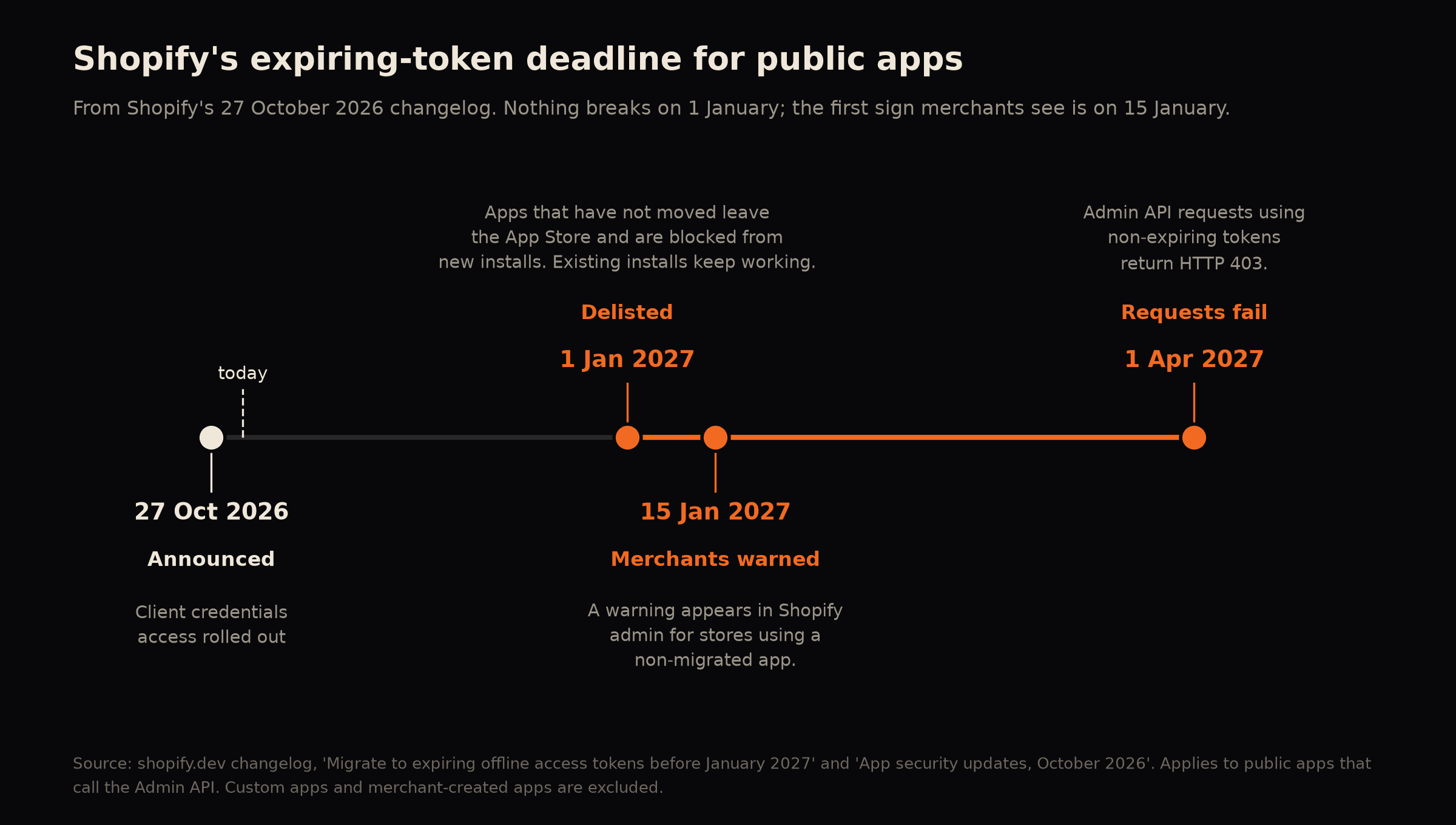
| 27 October 2026 | Announced. Client credentials access rolled out the same week. [2] |
| 1 January 2027 | Public apps that have not migrated are delisted and blocked from new installs. Existing installs keep working. [1] |
| 15 January 2027 | Merchants using a non-migrated app see a warning in their Shopify admin about the risk of service interruption. [1] |
| 1 April 2027 | Admin API requests using non-expiring tokens return HTTP 403. [1] |
Nothing breaks on 1 January. The first thing a merchant sees is on 15 January. The break comes on 1 April, and only for apps whose vendor did nothing in between.
Why Shopify is doing this
Shopify files the change under "app security updates". [2] The reason isn't stated, so this is my reading: a credential that never expires is the most useful kind to whoever steals it, because it keeps working until somebody notices and revokes it. An hour-long token shrinks that window.
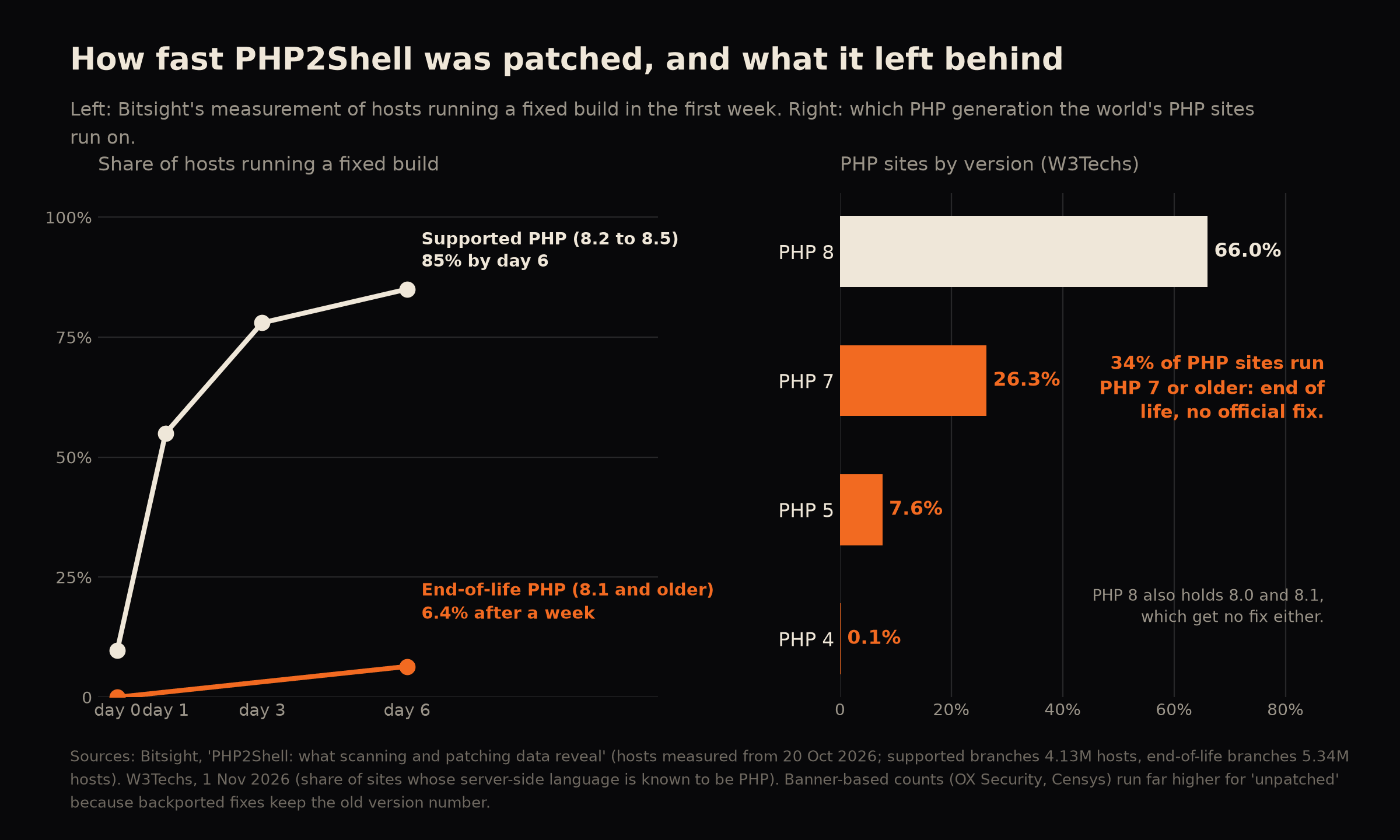
Long-lived credentials sitting on machines and in containers are also what attackers look for in much bigger incidents, like the Binance theft this month. [4] The PHP2Shell piece covers that one.
Shopify's October update added more in the same direction: an IP allowlist for Admin API access, a required network-access declaration in shopify.app.toml, developer identity verification for some store types, and an app security hub with a shopify app security check command. [2]
How to migrate to expiring offline access tokens, step by step
This is the section for whoever owns the app, and the one a store owner can use to judge a vendor's answer.
The mechanics, from Shopify's guide
Direct migration of an existing install is one request: [3]
POST https://{shop}.myshopify.com/admin/oauth/access_tokengrant_type:urn:ietf:params:oauth:grant-type:token-exchangesubject_token: the existing non-expiring offline tokensubject_token_typeandrequested_token_type:urn:shopify:params:oauth:token-type:offline-access-tokenclient_idandclient_secret, plusexpiring=1, which is mandatory
The response carries access_token, refresh_token, expires_in and refresh_token_expires_in. The access token lasts one hour (3,600 seconds). The refresh token lasts 90 days (7,776,000 seconds). [3][5] You refresh by calling the same endpoint with the refresh token before expires_in elapses, then store the new refresh token that comes back and use that one next time. [3]
That last sentence matters. Refresh tokens are single use. Shopify returns 401 Unauthorized with {"error": "invalid_request"} if a refresh token is expired, "already replaced by one your app has since used", or otherwise invalid, and the fix is that the merchant reopens the app in the Shopify admin to trigger a new token request. [3]
Other facts from the guide: [3]
- Migration "permanently invalidates the old token for GraphQL Admin API requests", and it is irreversible once the refresh token is used or a later token is acquired.
- If you lose the migration response, you can repeat the same request with the original token and valid credentials within seven days of the first exchange, and eligible retries return the same token pair.
- The direct flow covers background-only apps, such as webhook consumers, app proxy backends and Flow actions.
- The requirement applies to GraphQL Admin API requests. Custom apps and merchant-created apps are excluded.
Shopify also describes a recovery route. Client credentials access lets an app's backend request an access token by signing a short-lived JWT with its private key, without a merchant session. Tokens for public-distribution apps last up to one hour. [2][6]
The engineering gotchas (my judgement)
Shopify's guide does not address concurrency. Single-use refresh tokens create a hazard that Shopify's text implies and does not spell out:
- Two workers, one refresh. If two background jobs both see an expired access token and both call refresh with the same refresh token, one wins. The loser holds a refresh token that has already been replaced, receives
401 invalid_request, and, in a careless implementation, overwrites the good token with a failure. You need a per-shop lock or lease around refresh, and a rule that a worker which loses the race re-reads the stored token and retries instead of failing. - Writing the new refresh token before using the new access token. If you use the access token first and crash before storing the new refresh token, the old one is already spent. Store first.
- Long jobs. A sync that runs for more than an hour must handle a mid-run 401, refresh, and resume, not abort.
- Cached tokens. Any token cached in memory, in a queue payload or in a log line keeps being used after it has expired. Queue payloads that carry a token are the usual culprit. Pass the shop and look the token up at execution time.
- Encryption and logging. Refresh tokens are sensitive credentials. They belong in encrypted storage or a secrets manager, and they must never reach a log. [5]
- Uninstalls and expiries. A refresh token that has gone 90 days unused is dead. Decide what the app does for a shop that has been dormant: show a re-authorise prompt the next time they open it.
- Alerting. Count refresh failures per shop and alert on a rate, not on individual errors, because a handful of merchants hitting
invalid_requestis normal and a spike is not.
A rollout that does not hurt
- Add a token record per shop: access token, refresh token, expiry times, a migrated flag and a lock.
- Ship the refresh logic first, behind a flag, working on tokens that are already expiring (new installs).
- Test on a development store: install, wait for expiry, refresh, run a long job across an expiry, kill a worker mid-refresh.
- Migrate existing installs in cohorts through the token exchange, in a background job with backoff, and record each shop's result. The seven-day retry window is your safety net for a lost response. [3]
- Watch the metrics for a week. Only then remove the old path.
- Run Shopify's
shopify app security checkand review the October security features. [2]
What makes it hours and what makes it weeks
| Token storage | One table, one accessor | Tokens copied into jobs, caches and several services |
| Code | Maintained, with tests | Written by someone who has left, no tests |
| Background work | A few webhook handlers | Long syncs, several workers, third-party flows |
| Installs | Dozens | Thousands, with rate limits to respect |
| Observability | Metrics and alerts exist | Logs only |
| App Store status | A recent reviewed app | An old listing nobody has touched in years |
The other rule that catches custom apps: API versions
The token deadline does not apply to custom apps. A different rule does, and it fails more quietly.
Shopify releases a new API version every three months, and each stable version is supported for a minimum of 12 months, with at least nine months of overlap between consecutive versions. If an app targets a version that is no longer accessible, "Shopify falls forward and responds using the oldest accessible stable version". [7] That keeps the app running, and it means behaviour can change under it without a deployment on your side. The current stable version is 2026-10 and 2027-01 is in release-candidate. [7]
Two removals are already announced for 2027-01: the automaticDiscounts query and the metafieldInteger collection condition. [8] Separately, the Global Catalog REST API stops serving traffic on 2 November 2026. [8] A custom app that uses any of them, and that is pinned to an older version, meets the change when its version retires.
An hour's check on a custom app: find the API version it calls, list the queries and mutations it uses, and compare both against the changelog.
What to ask your vendors
Send this to the vendor of every public app that touches orders, stock or customers.
Shopify requires every public app that calls the Admin API to use expiring offline access tokens by 1 January 2027. Has your app migrated? If not, on what date will it, and will you tell us when it is done? If you are not planning to, tell us now so we can plan a replacement.
If the answer is "we are looking into it", the app is at risk. If the answer is a date before 1 January with a named person, you are fine. If the vendor is a single developer who has gone quiet, treat that as the answer.
What you can do yourself, and what needs a developer
Do today, yourself:
- List every installed app, mark the ones that touch orders, stock or customers, and put the vendor's answer next to each.
- Send the email above.
- Decide what you would do for each critical app if it were delisted.
- If you own a public app, find every place a token is stored and count your installs.
Needs a developer:
- Migrating a public app, which is token handling inside the app plus every existing install.
- An app whose original developer has gone.
- A replacement or custom app for something a delisted app did.
- Checking a custom app against the API version rules.
- Proving it works across an expiry, a lost response and a worker crash.
What I would do, and how it starts
I'm DC. I have 18 years in this work, I have audited 110 sites, and I do all of it myself. For an app or for a store that depends on apps it goes like this.
- A free 30-minute call. You tell me what the app or the dependency is. I tell you what the first step is.
- A first read, at a published price. For an app, the backend audit covers custom applications in PHP, Laravel, Django, Python, Next.js and Node: £1,200 at grey box (read-only access to the code and accounts) or £1,500 at white box, excluding VAT, five to ten working days from kickoff with a firm date before it starts. It would find every place a token lives, the refresh and background paths, and the API versions in use, and rank what to do first. You own the report. For a store that depends on third-party apps, a health check at £500 looks at one topic from the outside, and a conversation about the integrations is the faster start.
- A written scope and price for the migration, before any work starts. Priced on the value of the work, with a deposit before work begins. A token migration is a project, quoted per app, not part of a retainer's monthly time.
- The work. The token store, the refresh service with its locking, the cohort migration, the monitoring, and a note of what changed. If a store needs a replacement for a delisted app, that is a custom Shopify app built around Functions, checkout or the API.
- Keeping it done. A retainer keeps a healthy product current inside an agreed amount of monthly time. A version or token migration is a project quoted separately. For Laravel and PHP products that is the SaaS maintenance retainer, priced per product after the first read.
If the app's developer has moved on, the project takeover service starts with the same first read. For the connections between Shopify and the systems behind it, see the ERP and marketplace integration pages and the Shopify developer page. For automating a repetitive task, there is AI and automation.
What I need from you to start: the app's repository access you are happy to give (read-only is enough for the audit), where it runs, how many shops have installed it, and the one or two flows that must not stop.
The first step is a free call. If you would rather write it down first, use the contact page.
Related services
Store owners can see what I do on the Shopify developer page. Apps that talk to an ERP, a marketplace or a CRM are the ones most likely to hold old tokens, so see ERP integration, marketplace integration and CRM and email integration. For a check of every app and token in your store, the backend audit is the first step.
Questions people ask
We only use apps. Is this our problem? It is your problem if an app that touches your orders, stock or customers is public and its vendor does not migrate. You cannot migrate it yourself, so your job is to ask, set a deadline and have a plan B.
Does this apply to our custom app? No, for the token deadline. [2] The API version rules still apply to it.
Can we undo a migration? No. Shopify describes it as irreversible once the refresh token is used or a later token is acquired. [3] That is why the rollout above migrates in cohorts and keeps the old path until the metrics are clean.
What if a merchant never reopens the app? The direct migration covers background-only apps, so they do not need to. [3] A shop whose refresh token is invalid has to reopen the app to trigger a new token request. [3]
Is the REST Admin API affected? The guide says the requirement applies to GraphQL Admin API requests. [3] Check the app's own calls and Shopify's current guide.
Does a retainer cover this? No. A retainer keeps a healthy stack current inside an agreed amount of monthly time. A token migration is a project, quoted on its own.
◆ Glossary
- Public app
- an app listed in the Shopify App Store that any merchant can install.
- Custom app
- an app made for one store, either built in the store's admin or by a developer for that merchant.
- Admin API
- the interface apps use to read and change a store's data.
- Offline access token
- a credential an app keeps to act on a store when no merchant is present.
- Expiring token and refresh token
- a short-lived credential and the longer-lived one used to get the next. Here, one hour and 90 days, with the refresh token single use.
- Token exchange
- swapping one credential for another through a defined request. The migration uses it.
- Client credentials access
- an app's backend asks for a token by signing a short-lived JWT, without a merchant session.
- HTTP 403, 401
- the server refused the request, or the credentials were invalid.
- API version
- a dated, numbered release of Shopify's API, for example 2026-10.
- Delisted
- removed from the App Store, so new merchants cannot install it.
- Grey box, white box
- how much access an auditor is given. Grey box adds read-only access to code and accounts. White box includes servers and the database.
◆ Sources